Humanoid Robotics · Vision-Language-Action · Imitation Learning
Teaching a Humanoid Robot to Manipulate and Navigate: Two Simulators, 10,000 Demonstrations, π0.5 and PPO
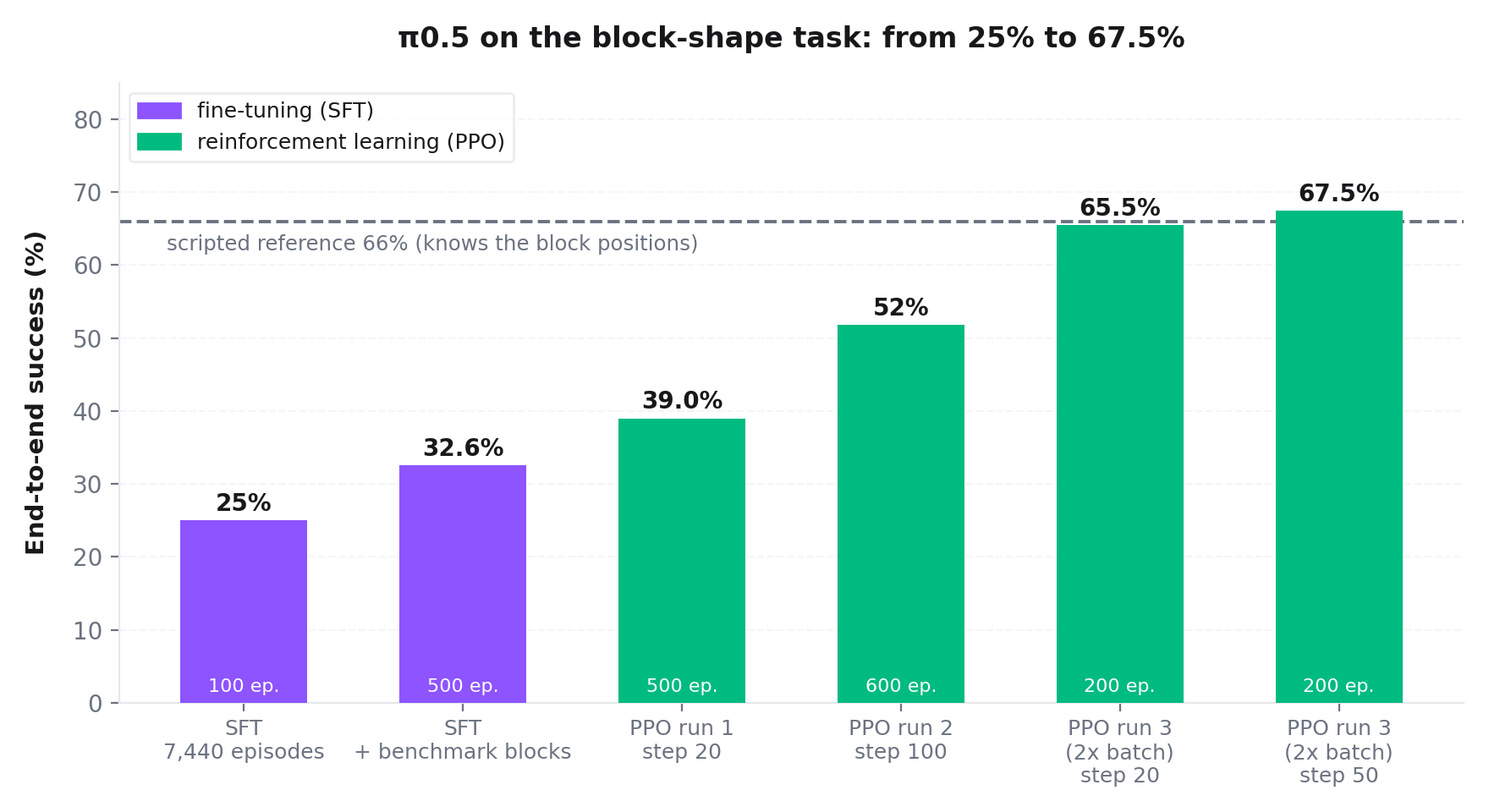
Can a 3-billion-parameter Vision-Language-Action (VLA) model control a full-size dual-arm humanoid? We used MuJoCo for fast physics and Isaac Sim for realistic rooms, and collected expert demonstrations with cuRobo. The first 1,312 demonstrations gave 15% success on a block-picking benchmark. Fine-tuning π0.5 on 10,000 demonstrations raised it to 32.6%. Reinforcement learning (PPO) then raised it to 67.5% end-to-end success. A scripted policy that knows the true block positions reaches 66%.
01Two simulators, one humanoid robot
The robot is the AgiBot Genie G2: an agile, full-scale dual-arm humanoid featuring an omnidirectional 4-wheel steered chassis, two 7-DoF arms, dual parallel-jaw grippers, and RGB vision sensors at the head and both wrists.
When training embodied intelligence for such a robot, roboticists usually face a dilemma:
- Option A: Pure fast physics (MuJoCo). Runs at 1,000 Hz on standard CPU cores, requires no GPU displays, and lets you iterate on kinematics, control loops, and navigation algorithms in seconds. But it lacks photorealistic household interiors and complex mesh collision meshes out of the box.
- Option B: Real USD rooms (Isaac Sim / Genie Sim). Delivers photorealistic kitchens, living rooms, and workshops with rich object variations and GPU-accelerated motion planners (cuRobo). But it demands massive GPU memory, headless display drivers, and multi-gigabyte USD asset streaming.
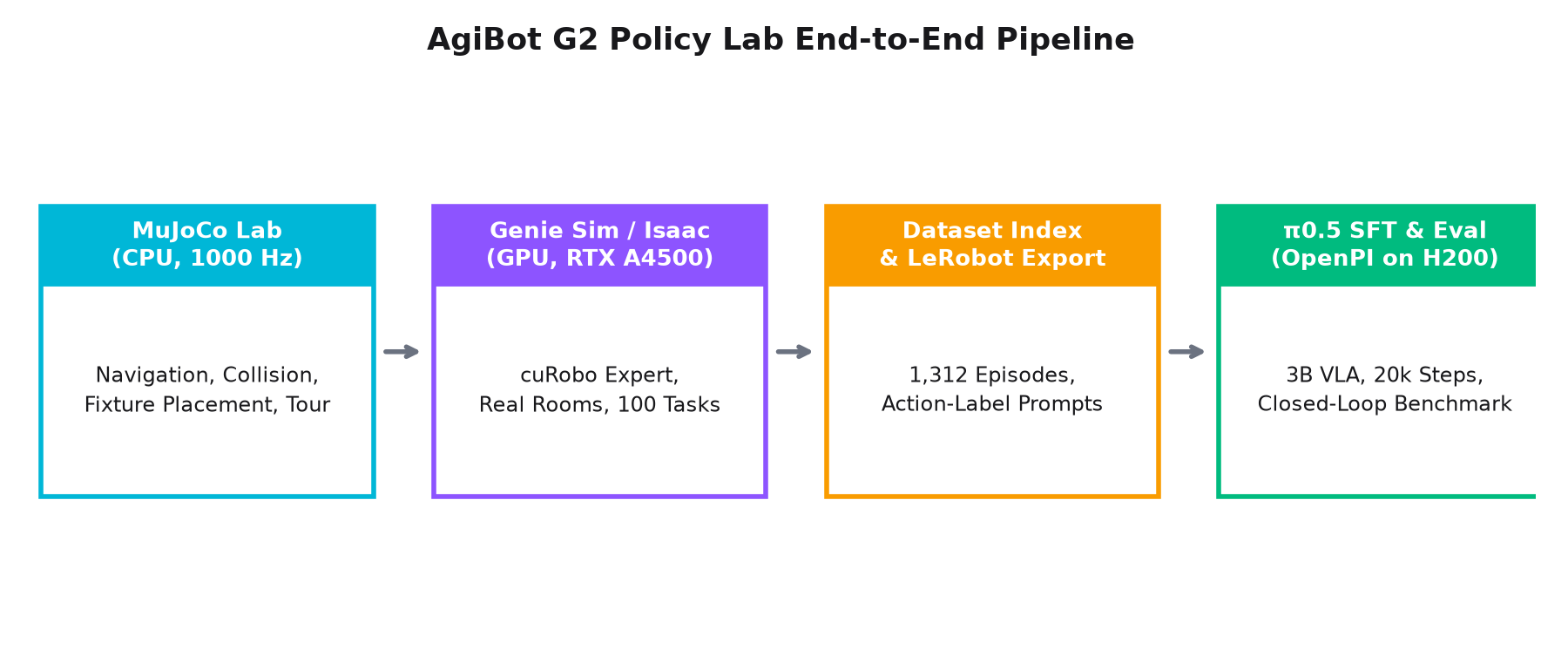
Instead of compromising or attempting fragile USD-to-MuJoCo mesh conversions, we chose both:
02The MuJoCo testbed: arm sag, contact hulls, and the obstacle tour
We started on CPU by importing the AgiBot G2 model and the place_workpiece workstation
into MuJoCo (45 bodies, 41 joints, 54 actuators). Headless stepping ran at 1,000 Hz
(time step 0.001 s) with 50 Hz control loops.
Almost immediately, we encountered two practical simulation traps:
1. The T-Pose and Arm Sag under Gravity
The raw CAD asset defines its default configuration (qpos0) as an outstretched T-pose.
Holding the robot in a natural working posture required folding the arms closer using numerical IK.
However, holding the measured joint positions caused the heavy humanoid arms to sag downward
under gravity by several centimeters. Actuators in PD position control require commanding the
actuator target pose rather than feeding back sagging joint encoders.
2. Zero-Collision Workstations
The imported scene had zero collision primitives on the arms, torso, or station mesh. An arm could plow straight through steel fixtures without resistance. We constructed 35 custom collision hulls to box the station plates, thickening the thin metal sheets on their far sides to prevent high-velocity tunneling.
The Full G2 Tour Task
With collisions secured, we implemented a 4-wheel steered base navigator utilizing grid A* path planning. The navigator plans around obstacles, docks with a 0.6 m standoff, aligns heading, and executes the workpiece placement. In the G2 Tour task, the robot navigates past 6 randomized obstacles, docks at the assembly station, aligns the workpiece 5 mm above fixture pins, retracts, and returns safely:
03Moving to real rooms: headless Isaac Sim
To learn generalized vision-language policies, we needed visual variety: real kitchens, living rooms, and offices with dozens of objects. We installed Isaac Sim 5.1 natively alongside Genie Sim and tried it on different GPUs.
Here we hit an unexpected hardware reality: NVIDIA driver compatibility.
| GPU Partition | Driver | Isaac Sim RTX Renderer | Operational Role |
|---|---|---|---|
| RTX A4500 (20 GB) | 575.57 | Renders at 57 Hz (RGB active) | Data collection & benchmark evaluation |
| NVIDIA H200 (141 GB) | 570.211 | Fails: "Cannot load shader file" | VLA SFT training & policy inference |
| RTX 2080 Ti (11 GB) | 610.xx | Crashes: rtx.scenedb plugin exit | Unsupported |
On H200 GPUs under driver 570, Isaac Sim's physics loop spun at 475 Hz because the renderer failed silently, leaving camera annotators completely blank. On A4500 GPUs (driver 575), full 3-camera RGB rendering ran smoothly at 57 Hz. We therefore partitioned the workload: Isaac Sim simulation strictly on A4500s, and VLA training and inference on H200s.
04The cuRobo auto-collect expert
Human teleoperation does not scale to thousands of demonstrations. Genie Sim incorporates NVIDIA's cuRobo—a GPU-accelerated collision-free trajectory optimizer running natively inside the simulation loop.
A lightweight recorder synchronizes joint encoders, camera frames, and task labels directly into HDF5 files and JPEGs.
Here is a gallery of verified autonomous expert demonstrations recorded across diverse room environments, manipulation primitives, and semantic reasoning challenges:
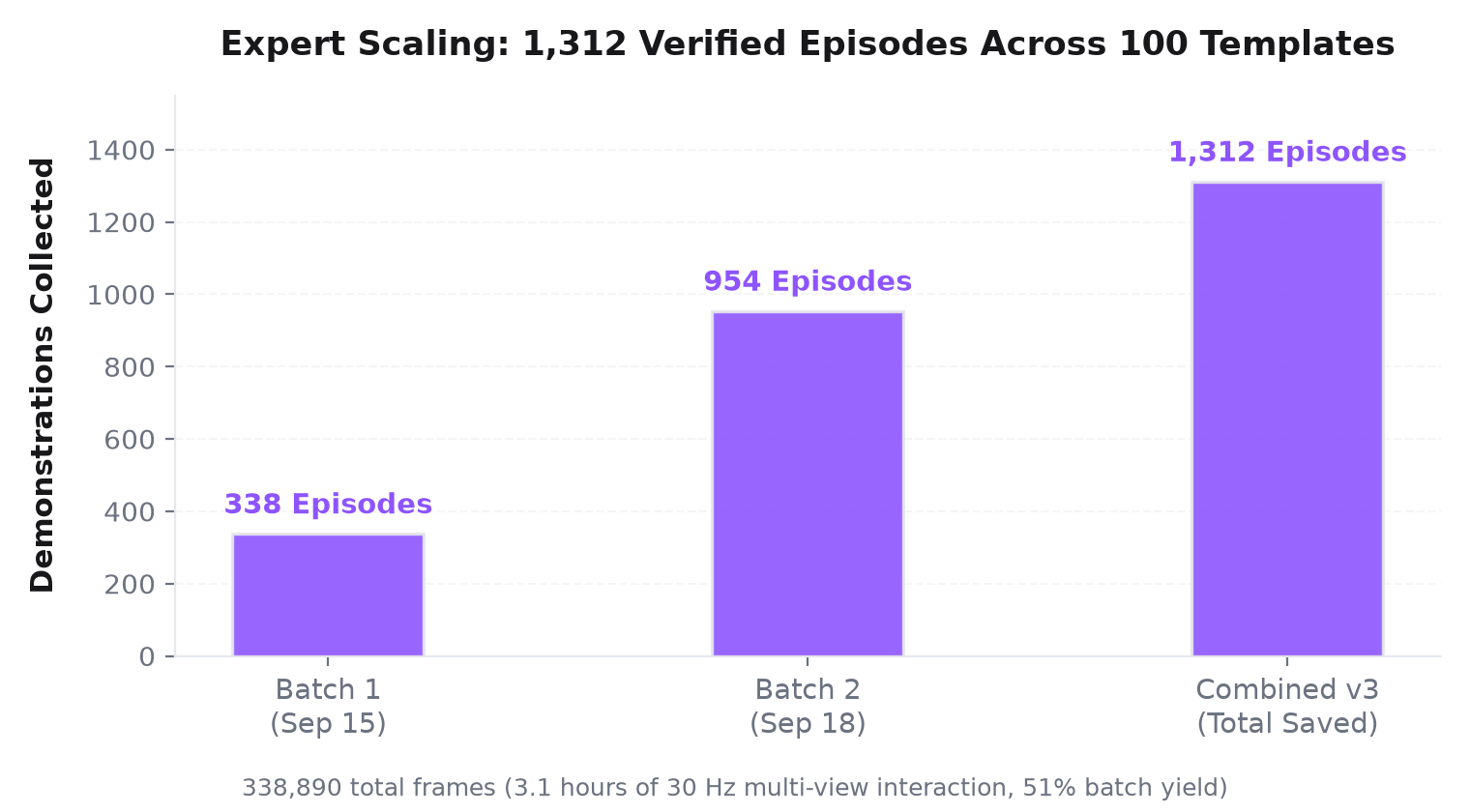
The expert achieved a 51% yield across 100 task templates. An interesting empirical rule emerged from our log analysis: if cuRobo requires 3 or more trajectory retries on a layout, it fails 89% of the time. Failing early and moving to a new layout saved hundreds of GPU hours.
05Scaling the demonstrations: 1,312 episodes
With automated collection running in parallel on many GPUs, we scaled from a small pilot to a comprehensive multi-task dataset:
Key dataset verification metrics:
- Frame Timing: Camera directories and HDF5 numerical joint records agree across all 1,312 episodes at exactly 33.3 ms per frame (30 Hz).
- Temporal Lead: Target action commands lead joint position state by exactly 3 frames (100 ms), providing the predictive horizon needed for imitation learning.
- Grasp Timing: Grippers close within the
pickphase label in 100% of saved episodes. - Format Export: Packaged into LeRobot v3 format with train/test splits (1,116 train / 196 test) across 14 held-out templates.
06Fine-tuning π0.5 with OpenPI
For our policy, we adapted π0.5, a 3-billion-parameter Vision-Language-Action model built upon a flow-matching action chunking backbone.
| Component | Specification | Details |
|---|---|---|
| Vision Inputs | 3 cameras × 224×224 RGB | Head camera, Left wrist, Right wrist |
| Proprioception | 14 joints | 7-DoF left arm + 7-DoF right arm positions |
| Action Output | 10-step chunk (1.0 s horizon) | 14 joint targets + gripper commands at 10 Hz |
| Compute | 1× NVIDIA H200 (141 GB) | Batch size 128, 20,000 optimization steps |
| Final Loss | 0.0058 | Smooth convergence from step 0 to 20,000 |
Training ran on one H200 GPU, with a checkpoint every 2,000 steps. Loss converged from 0.045 down to 0.0058. But does a low training loss mean the robot actually succeeds in the simulator?
07The prompt mystery: 0.7% vs. 7%
We evaluated the first fine-tuned checkpoint (v1, step 1,000) closed-loop in Isaac Sim on the
standard benchmark task: g2op_if_pick_block_shape (100 episodes).
The robot was nearly paralyzed. Across 300 evaluation attempts, the arms moved toward the table and then hovered aimlessly above blocks without closing the gripper. Commanded joint deltas were vanishingly small (< 0.06 rad over a 1-second chunk).
Was the model underfitted? Did it need more steps or larger networks?
When we inspected the tokenized instructions, we found a critical mismatch:
- In v1, the model was trained with high-level task names:
"pick the cube building block from the table". - In the benchmark, the evaluation harness queries the policy with granular action labels:
"Right arm picks up the cube block on the table".
Because the prompt wording differed, the cross-attention layers failed to route attention to the right arm! We re-exported the dataset with action-label prompts (v2) and retrained for the exact same 1,000 steps on identical data:
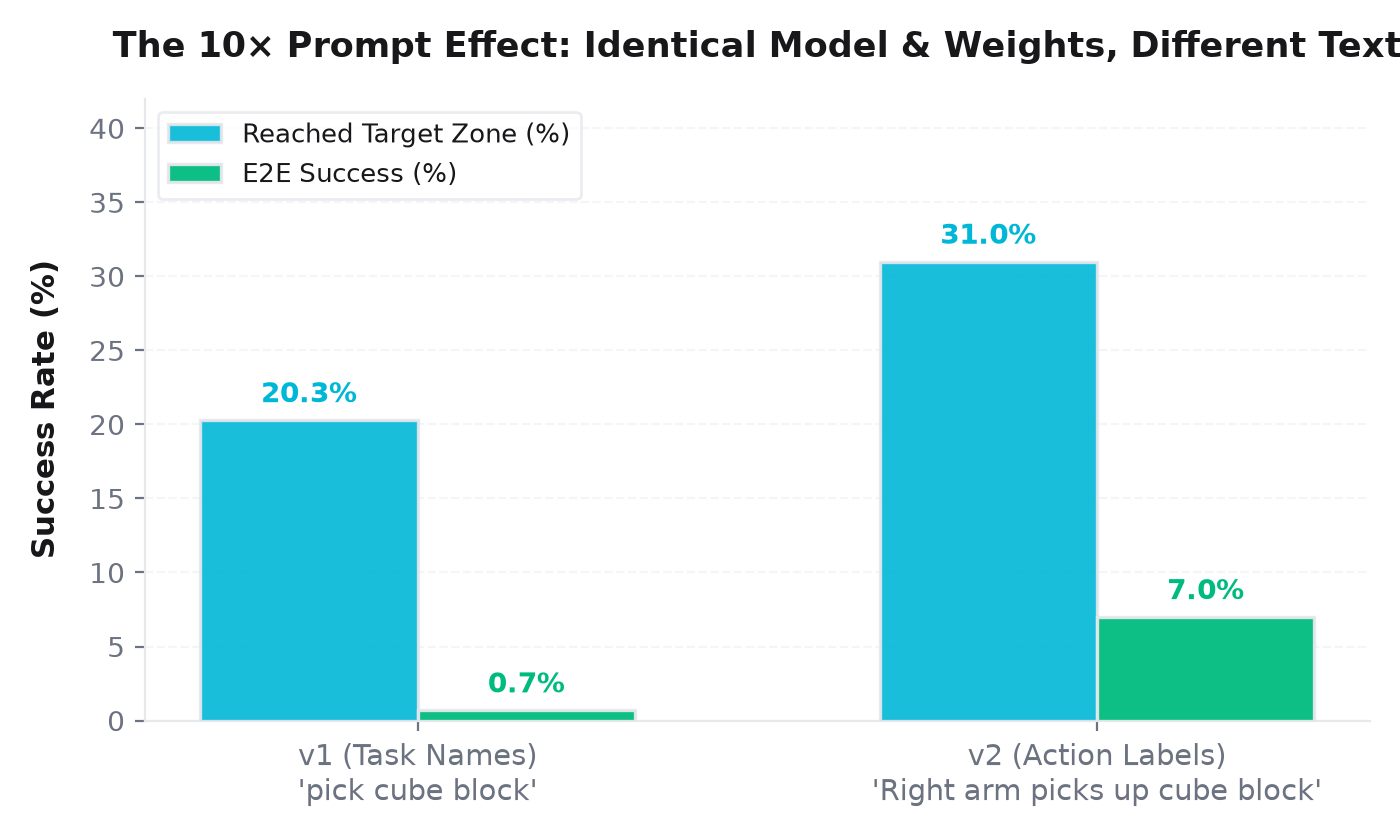
Language alignment in VLAs is as critical as visual representation. A policy that looks completely broken may simply be confused by prompt grammar.
08Closed-loop evaluation & the grasp bottleneck
With prompt semantics resolved, we tracked policy performance across the full 20,000-step training trajectory:
| Checkpoint | Training Steps | Reach Target Zone (%) | End-to-End Success (%) |
|---|---|---|---|
| v1 Checkpoint | 1,000 | 20.3% | 0.7% |
| v2 Checkpoint | 1,000 | 31.0% | 7.0% |
| v2 Checkpoint | 4,000 | 39.0% | 4.0% |
| v2 Checkpoint | 14,000 | 45.0% | 8.0% |
| v2 Checkpoint | 20,000 | 41.0% | 12.0% |
| v3 Checkpoint (Peak) | 8,000 | 37.0% (48% matched) | 15.0% |
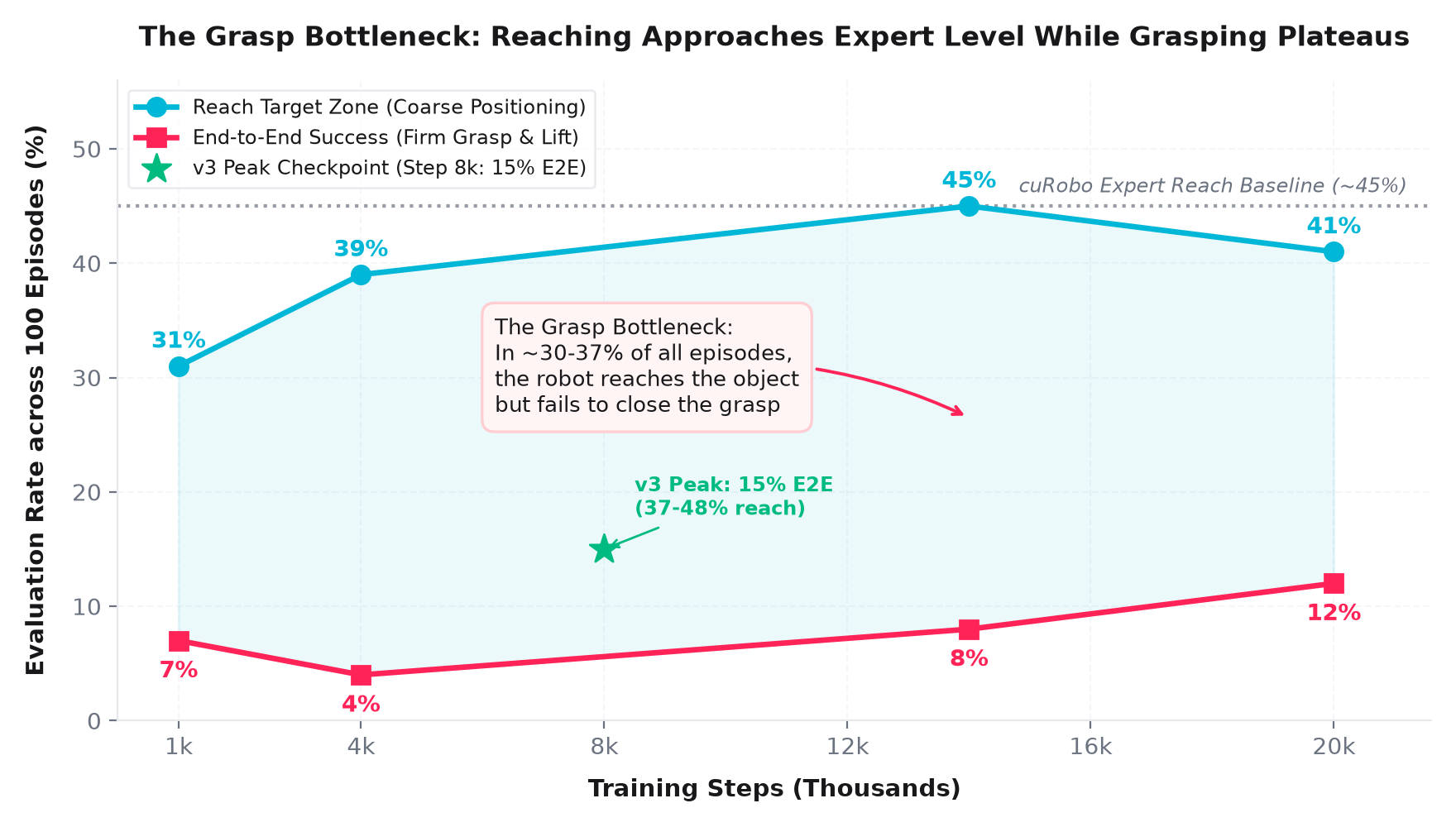
This plot reveals the central challenge in modern VLA manipulation:
The Grasp Bottleneck: The VLA easily learns coarse semantic reaching—it moves the gripper directly above the target block in nearly half of all episodes (matching the cuRobo expert's 45% baseline). However, converting a near-miss into a firm grasp requires millimeter-level contact precision and precise gripper closing. Because continuous regression averages out crisp open/close boundaries, the policy often closes slightly too early or late.
Two episodes of the v3 checkpoint (step 8,000) show the difference. In each video, the left part is the head camera and the right part is the wrist camera of the named arm.
09More and more varied data: domain randomization
The 1,312 demonstrations had only 92 block-picking episodes, and they all looked alike: the same lights, the same sky, almost the same start pose. So we wrote randomized copies of the 7 block-shape templates. The ranges follow the benchmark's own generalization tests.
| What varies | Range |
|---|---|
| 8 room lights | intensity ×0.3 to ×3, colour 3,000–9,000 K |
| Sky (dome light) | one of 21 HDR images, downscaled to 4K (8K skies ran the 20 GB GPUs out of memory) |
| Arm start joints | ±0.1 rad (before: ±0.01) |
| Robot base | ±0.1 m |
We collected 7,441 successful episodes with these templates. One template (triangle) is held out as the test set.
10A hidden data bug: retries inside episodes
We wrote a check notebook for the new data: counts, split, timestamps, grippers, prompts, images and norm stats. One check failed. In some episodes the arm moved up to 2 rad in 33 ms, which no real arm can do.
The videos showed why. When a grasp misses, the collector does not end the episode. It moves the arm back to its start pose in one frame, opens the gripper and tries again. The episode is saved as a success when a later try works. So these episodes teach a missed grasp, followed by an impossible jump.
| Data | Episodes with a retry |
|---|---|
| First 1,312 episodes (all earlier models) | 13.6% |
| Domain-randomized episodes | 5–6% (16–18% in the test template) |
The fix: keep only the frames after the last retry, because the arm is back at its start pose there. A larger jump to anywhere else drops the episode. The first version of this rule also dropped small contact jolts, and the check caught that too: the same episode was dropped at 10 fps and kept at 30 fps. After the fix, all 72 checks pass on all the new data.
11π0.5 on 7,440 episodes: 25% end-to-end success
We merged the first data and both randomized shares (retries cut) into one set of 7,440 training episodes and fine-tuned π0.5 again.
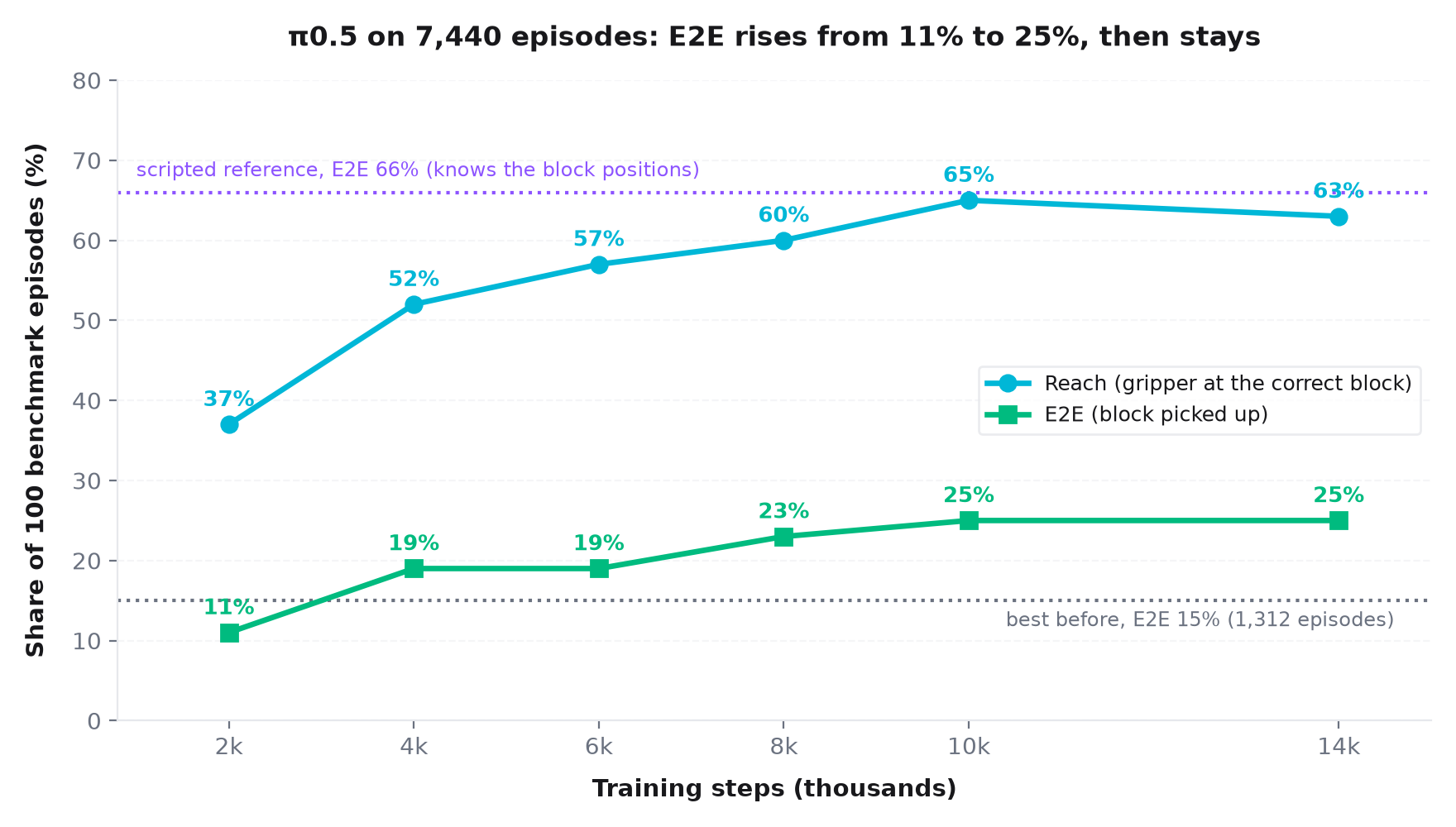
| Checkpoint | Reach | End-to-end success |
|---|---|---|
| Best before (1,312 episodes, step 8,000) | 48% | 15% |
| Merged data, step 2,000 | 37% | 11% |
| Merged data, step 8,000 | 60% | 23% |
| Merged data, step 10,000 | 65% | 25% |
| Merged data, step 14,000 | 63% | 25% |
After step 10,000 the score stays at 25%. More steps on the same data do not help. Better data raised it to 32.6% (section 15).
12Other model families
We also fine-tuned eight other model families on the same task. None came close to π0.5 with PPO (67.5%, section 17).
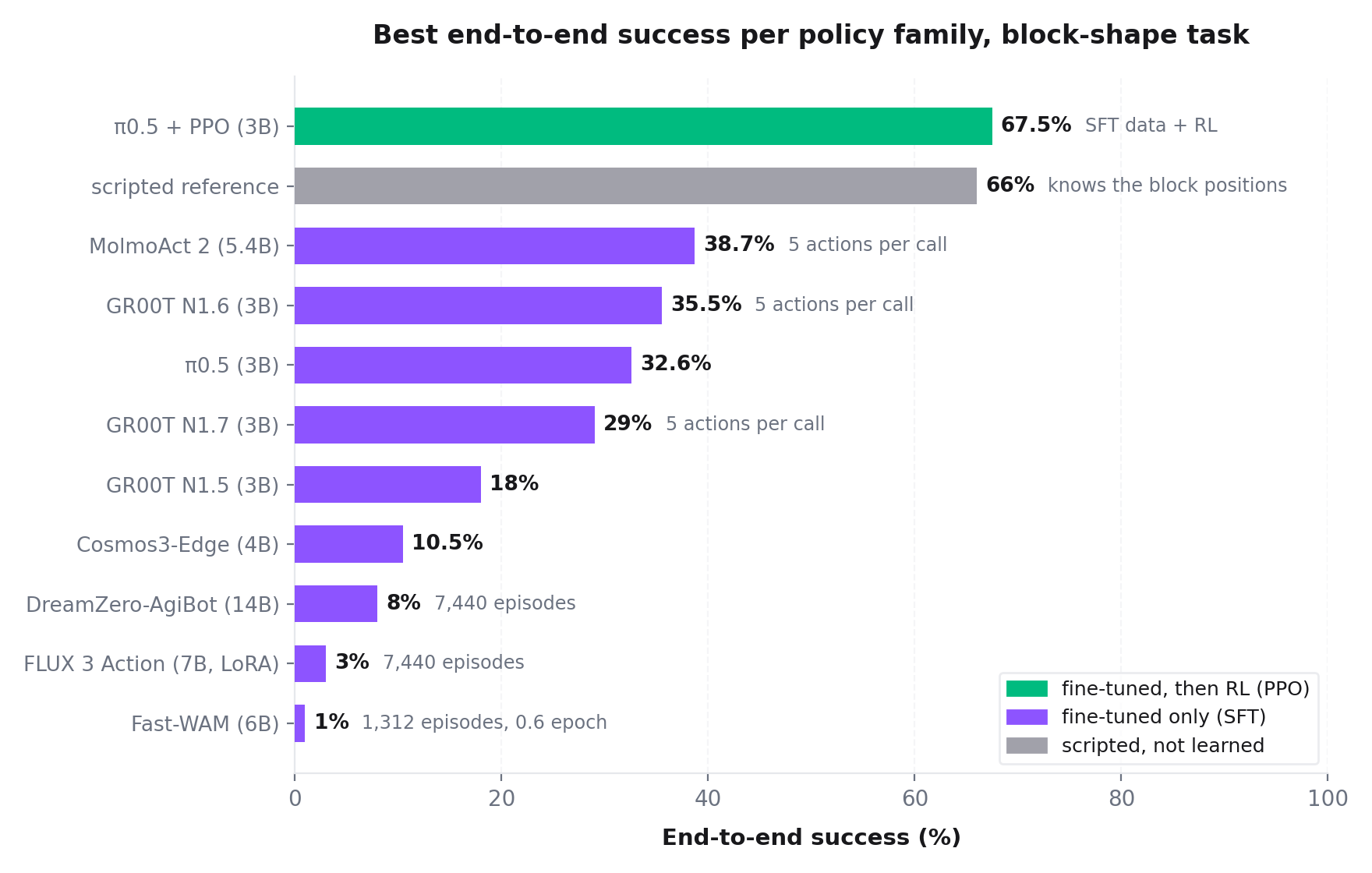
Five of them were trained on the same data as our best π0.5 fine-tune (section 15). Without RL, the best of them are at the level of π0.5:
| Model (same data) | Size | Best end-to-end success | Episodes |
|---|---|---|---|
| MolmoAct 2 | 5.4B | 38.7% | 600 |
| GR00T N1.6 | 3B | 35.5% | 200 |
| π0.5 (SFT only) | 3B | 32.6% | 500 |
| GR00T N1.7 | 3B | 29.0% | 200 |
| GR00T N1.5 | 3B | 18.0% | 200 |
| Cosmos3-Edge | 4B | 10.5% | 200 |
- Without fine-tuning, no model picked up a block. MolmoAct 2, GR00T N1.5 and N1.6, two Cosmos3 policies and DreamZero-AgiBot all scored 0%. None of them was trained on our robot.
- Look again sooner. MolmoAct 2, GR00T N1.6 and GR00T N1.7 do better when they run only 5 of their predicted actions and then look again. This added 6.7 points for MolmoAct 2 and 5.5 points for GR00T N1.6. It did not help π0.5.
- The large gain came from RL. So far we ran PPO only for π0.5. Our RL code does not support MolmoAct 2 yet. PPO on GR00T N1.6 is running. A longer GR00T N1.7 fine-tune is also running, because N1.7 was still improving at the end of its run.
- World action models predict the video and the actions together. They were trained on less data. DreamZero-AgiBot (14B) reached 8% after 2,000 steps, then got worse (0–1%) while its training loss kept falling. It is also 4 times slower per episode (65 s against 15 s). We paused it. FLUX 3 Action (LoRA) reached 3%. Fast-WAM reached 1%. It saw only the first 1,312 episodes, for 0.6 epoch. A second run that trained only its action part did not help.
Example episodes of the other model families:
13Why one shape scored 0 of 20
Four of the five benchmark shapes improved with training. The hexagonal prism stayed at 0 of 20 in every checkpoint, and the arm reached it in only 3–5 of 20 episodes.
The reason was the object itself. The benchmark's hexagonal block is a small, light blue block of about 2.5 cm. The block in our collection templates is an orange 5 cm block. So the model had never seen the benchmark's hexagon. In the videos it grabbed the big blue cube instead.
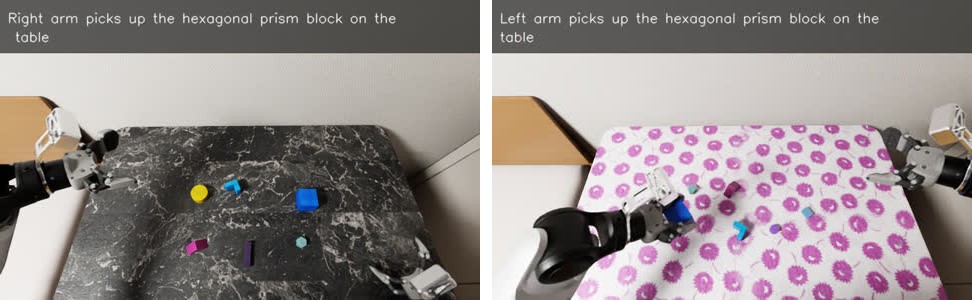
The other shapes use benchmark objects that partly overlap with ours. So we collected 1,249 new episodes with the benchmark's own blocks, 622 of them with the hexagon (section 15).
14A scripted reference: 66%
How good could a policy be on this benchmark? We wrote a scripted policy that reads the true block position from the simulator, moves the hand straight down, closes the fingers across the narrowest side of the block and lifts it. It has no motion planning.
The first version picked up nothing: the arm lagged up to 36 cm behind the planned path, so the fingers closed in the air. After each step waited until the hand arrived, it reached 99% and succeeded in 66% of episodes.
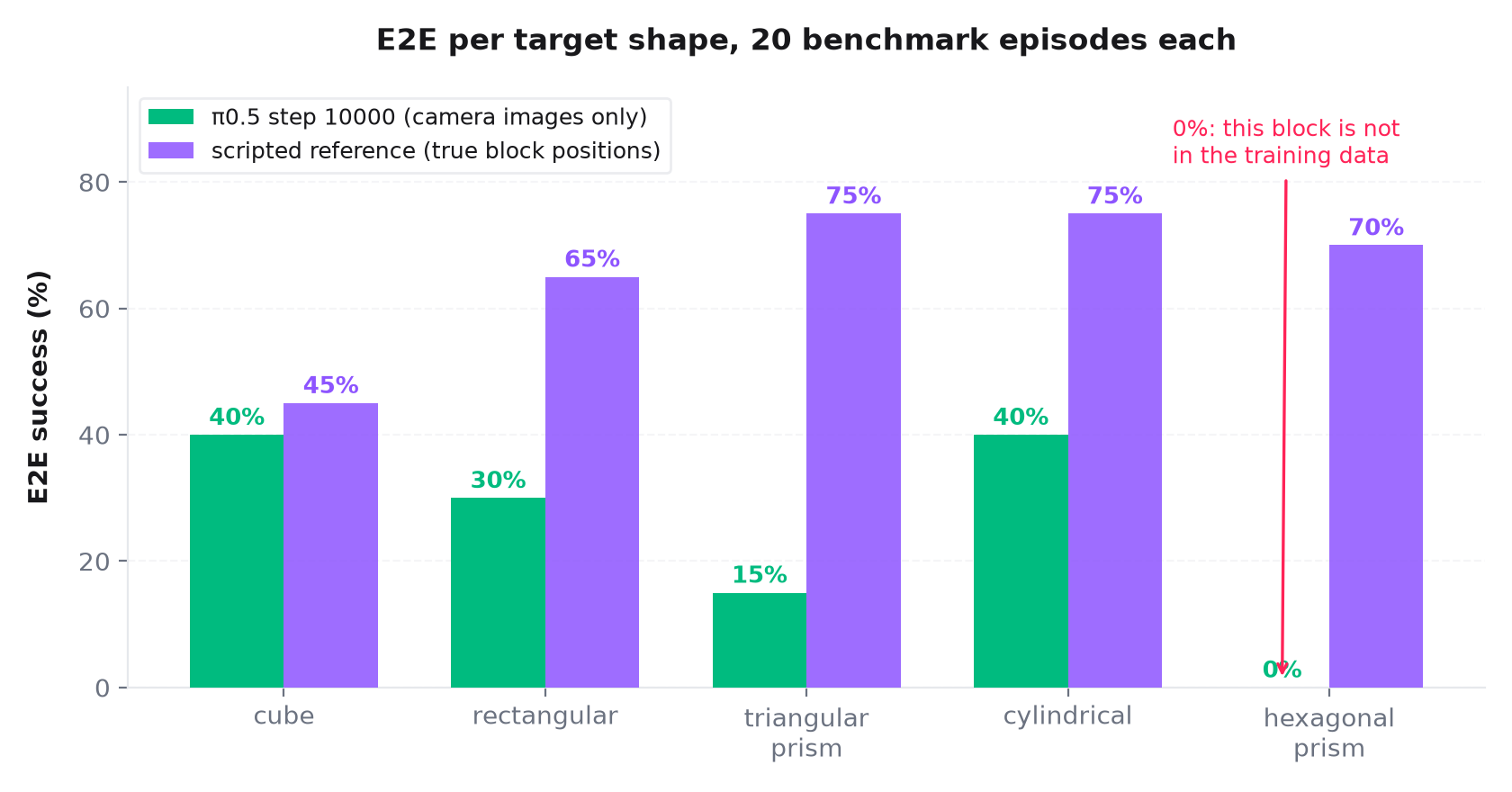
It lifts the small hexagon in 14 of 20 episodes, so that block can be grasped. The gap between π0.5 (25%) and the scripted policy (66%) shows how much room is left for a policy that sees only camera images. Section 17 shows that PPO closed this gap.
15Better data for fine-tuning: 32.6%, and why DAgger did not help
Section 11 ended at 25%. Three changes to the training data raised it:
- The benchmark's own blocks: we collected 1,249 new episodes with the benchmark's target blocks. 622 of them pick the small hexagon.
- No held-out template: the benchmark is our test, so the held-out triangle template went into training too. Before, the triangle had only 11 training episodes.
- More weight on the grasp: the frames around each grasp appear twice in the training data.
This gave 9,963 training episodes. π0.5 at step 24,000 reaches 32.6% end-to-end success over 500 episodes, with about 80% reach. The hexagon went from 0 to 7 of 20.
The largest failure is now "closed on air" (34.5% of the episodes). The fingers close 2–5 cm next to the block. After such a miss the policy never opens the gripper again. The expert never missed in the training data, and we cut the retries (section 10). So the policy never saw a recovery.
DAgger: four rounds, no gain
In DAgger, the learned policy drives the arm. Near the block, or after a miss, the cuRobo expert takes over and finishes the grasp. These episodes show how to open the gripper and try again. We ran four rounds and trained six data sets.
- The policy learned to recover. After a miss it opened the gripper again in 71–93% of the episodes. Without DAgger it did so in 2–5%.
- But it started to hesitate. More episodes ended with "never closed": the policy stopped above the block. The reason: the expert turned the wrist before it closed. So the labels said "do not close from your own pose".
- No DAgger set beat SFT by 5 points, our stop rule. The best sets reached 31–36%, against 32.6%. We stopped DAgger after round 4.
16Reinforcement learning that works: 39%, then 52%
Our first PPO runs did not improve the policy. We found three reasons:
- Prompt wording: the RL rollouts used the benchmark's words, while every evaluation used the training words.
- Frozen weights: the weights were stored in bf16 without full-precision copies. Most updates were smaller than one bf16 step, so about 95% of the model never changed. Stochastic rounding fixed this.
- Critic: the value network got only 4 gradient steps before the policy started to move. Now it first trains alone for several PPO steps.
The reward pays for the grasp, not only for the reach. It gives 0.2 when the gripper reaches the right block and 1.0 when the block is lifted. Each part is paid once per episode. PPO trains in 15 of the 20 benchmark scenes. The other 5 scenes are never used in training (section 17).
| Policy | End-to-end success | Episodes |
|---|---|---|
| SFT, step 24,000 (start) | 32.6% | 500 |
| PPO run 1, step 20 | 39.0% | 500 |
| PPO run 1, steps 30–70 | 15–30% | 200 each |
| PPO run 2, steps 90 and 100 | 52% | 600 each |
Run 1 started from the SFT policy. At step 20 it reached 39.0%. Then it became unstable. Each PPO step made one large update, and nothing kept the policy close to where it started. A small penalty for closing on nothing also taught the policy not to close.
Run 2 started from run 1 step 20 and took smaller steps. It used a lower learning rate (2e-6), 4 minibatches and 2 epochs per PPO step, and no penalty. With several minibatches, PPO's clipping can act. The run was slow: the score rose only after about 70 steps. Steps 90 and 100 reached 52%. Later steps stayed between 48% and 58%. After step 100, the arm reached the block more often (88% to 95%). But "closed on air" grew by the same amount (25% to 33–36%).
17Bigger PPO batches: 67.5%, at the level of the scripted expert
Run 2 used 1,280 samples per PPO step. Run 3 doubles this to 2,560 samples (16 rollout rounds × 20 steps × 8 simulators). It starts from run 2 step 100. All other settings stay the same. One PPO step takes about 22 minutes.
| Run 3 step | End-to-end success | Episodes |
|---|---|---|
| 0 (= run 2 step 100) | 52% | 600 |
| 10 | 53.5% | 200 |
| 20 | 65.5% | 200 |
| 30 | 62.5% | 200 |
| 40 | 67.5% | 200 |
| 50 (final) | 67.5% | 200 |
| 60 | 65.0% | 200 |
The score jumped at step 20. After that it stayed between 62.5% and 67.5%. Steps 40 to 60 together give 66.7% over 600 episodes. So we stopped the run. The final policy is step 50.
The final policy sees only camera images and joint angles. It succeeds as often as the scripted policy that reads the true block positions from the simulator (66%).
What changed
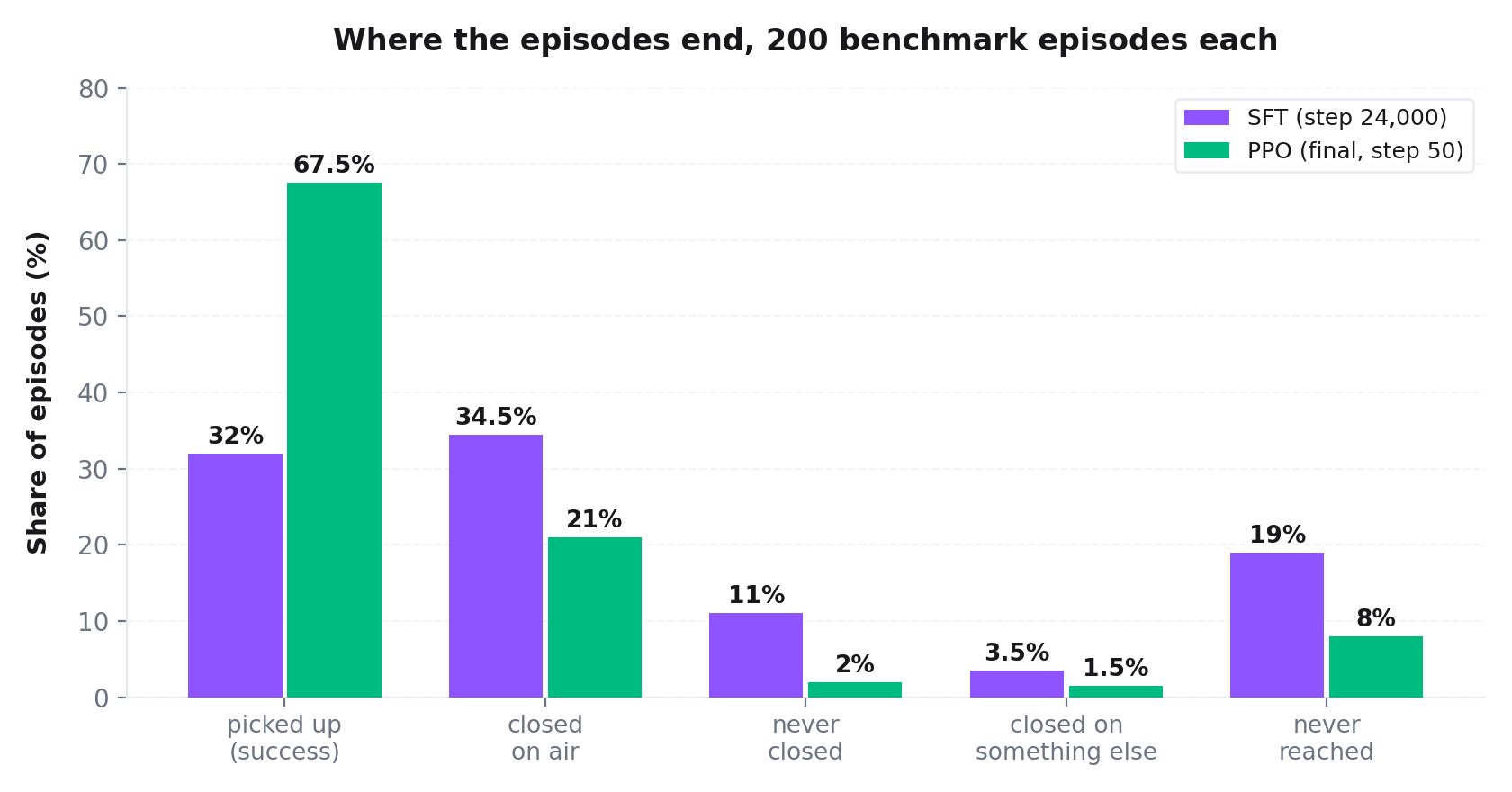
Every failure group became smaller. "Closed on air" fell from 34.5% (SFT) and 30% (run 2, step 160) to 21%. Triangular blocks were the hardest shape. Run 2 picked up 9 of 40 at step 160. Run 3 picked up 23 of 40 at steps 20 and 30.
Does PPO overfit the training scenes?
| Benchmark scenes | End-to-end success (step 50) |
|---|---|
| 0–14 (used in PPO training) | 65.3% (98 of 150) |
| 15–19 (never used in training) | 74.0% (37 of 50) |
The unseen scenes score higher. So we see no sign that PPO overfits the training scenes.
An idea that did not work: cropped wrist images
The wrist cameras record 1280×1056 pixels, but the policy sees 224×224. So a 2–5 cm block is only 10–25 pixels wide. We cropped both wrist images to the area around the fingers before the resize. This gives about 2 times more pixels across the block. We fine-tuned the SFT policy on the cropped data. It got worse: 28.5% and 25.0%, against 32.6%. "Closed on air" rose to 37–40.5%. We dropped the crop.
18Robustness: PPO is better than SFT on every test
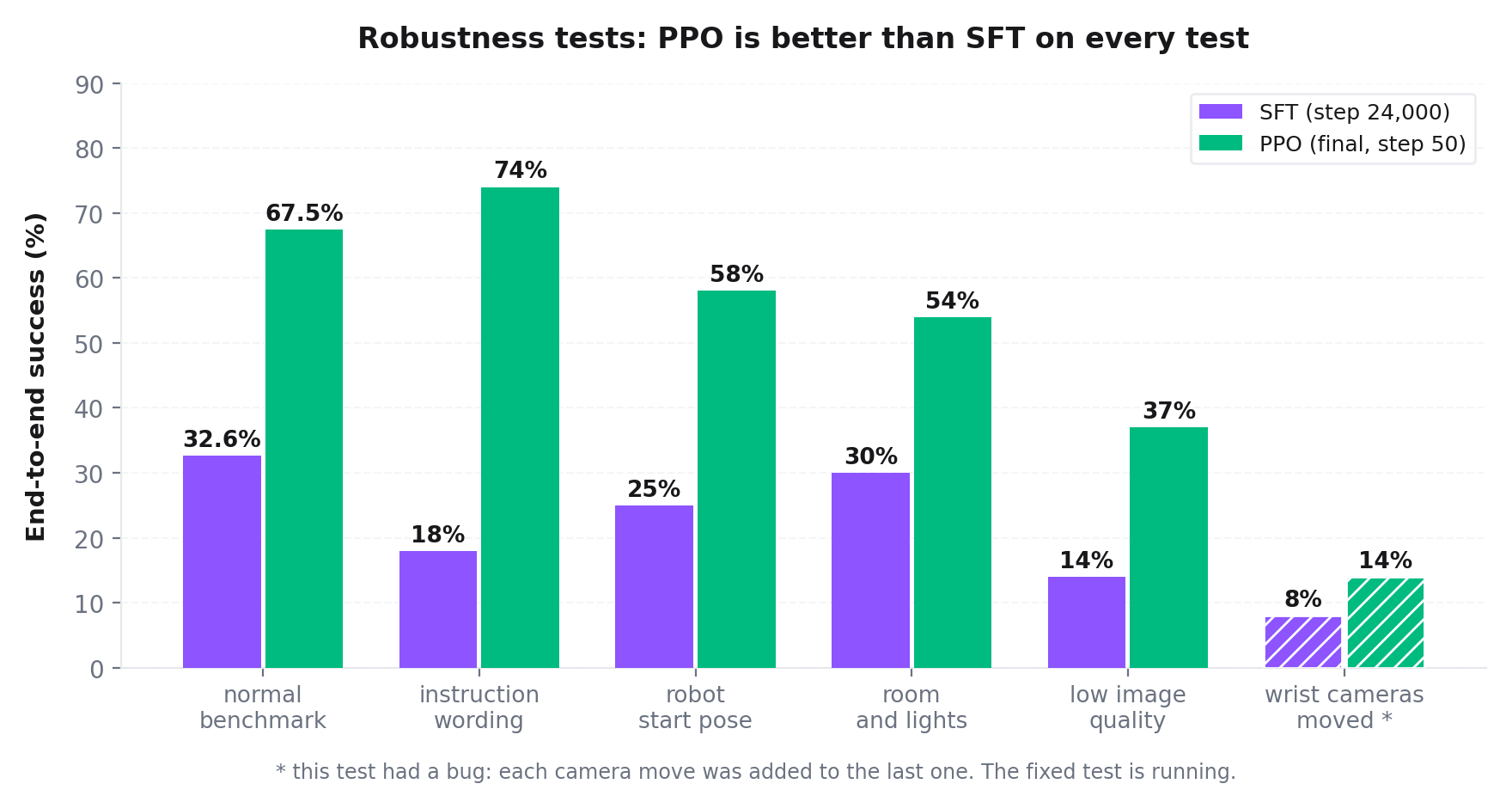
The benchmark has five robustness tests. Each test keeps the task and changes one thing. We ran each test for 100 episodes, for the final PPO policy and for the SFT policy.
| Test | What changes | SFT | PPO |
|---|---|---|---|
| Normal benchmark | nothing | 32.6% | 67.5% |
| Instruction wording | other words for the same task | 18% | 74% |
| Robot start pose | base moved up to 10 cm, other arm start joints | 25% | 58% |
| Room and lights | other room, lights, sky and materials | 30% | 54% |
| Low image quality | image noise, lens dirt, black dropped frames | 14% | 37% |
| Wrist cameras moved * | both wrist cameras moved by about 1 cm and turned by up to 10° | 8% | 14% |
- PPO did not make the policy fragile. It is better than SFT on every test.
- New instruction wording does not hurt PPO: 74%, higher than on the normal benchmark.
- Both policies are weakest when the wrist cameras move or the images get worse. So this weakness comes from the SFT data, not from PPO.
* A bug in the moved-camera test. The test moves both wrist cameras once per scene. But it added each new move to the last one, because the scene is not reloaded between scenes. After 10 scenes the cameras were about 9 cm above their normal place. After the 5th scene no episode succeeded, for both policies. In the first scene, after one move, the PPO policy still succeeded in 2–3 of 5 episodes. We fixed the test: each move now starts from the original camera pose. The fixed test is running. So the 14% and 8% are too low.
19What failed, and what we learned from the logs
Engineering embodied AI on shared GPU machines involves solving many unglamorous issues:
- Thin Objects and Contact Physics: Pencils and pens slipped out of the parallel grippers in 15 of 30 test runs. The simulator's contact solver struggled with thin cylindrical friction cones. We excluded stationery templates from Batch 2 to prevent training on degenerate slipping trajectories.
- Missing Asset Assertions: A background study room scene crashed validation because an indoor plant mesh was marked as a decorative asset without interaction bounding boxes. Adding explicit asset type checking in the client stabilized batch runs.
- The Frozen Goal Trap: In early data piping experiments, an observation module stored goal targets by reference rather than copying them. While the visual renders showed moving goals, the network input remained frozen to the very first coordinate for hundreds of episodes. When an input doesn't change, the network silently learns to ignore it.
- Check the data before training: the retries inside episodes (section 10) were in every dataset we had trained on. One notebook with 72 checks found them.
- Check which objects the benchmark uses: one shape was 0% only because its object was never in our data (section 13).
- GPUs for the simulator: Isaac Sim needs RT cores. It failed on the RTX 3080 GPUs (shaders did not load), and it does not render correctly on H200 or A100 GPUs, which have no RT cores.
- Check that the weights really change: in bf16 without full-precision copies, about 95% of the model never changed during PPO (section 16). A count of the changed weights showed it.
- A metric can mislead: the critic's explained variance was computed over groups of 8 samples and then averaged. Most groups had no success, so the number was far below 0. Over the whole batch, the critic was useful.
- Check that every simulator setup shows the same scene: one of our setups loaded the table and the blocks, but not the room around them. For the same checkpoints its scores were 6–18 points lower. We found it by comparing the first camera image of the same episode.
- Check what the labels teach: in DAgger the expert turned the wrist before it closed. So the new data taught the policy to hesitate (section 15).
- Check the test, too: the benchmark's moved-camera test added up its camera moves (section 18).
20What is next
- Robust PPO: a new PPO run starts from the final policy. In 3 of its 8 simulators the wrist cameras move. In 3 others the images get noise, lens dirt and dropped frames. 2 stay normal. We will score it on the normal benchmark and on the fixed camera tests.
- New data with camera changes: 4,824 training episodes were exported again with low image quality. The actions stay the same, only the images change. We are also collecting about 3,000 new expert episodes with moved wrist cameras. We will use this data for fine-tuning if the robust PPO run is not enough.
- Other model families: PPO on GR00T N1.6 and a longer GR00T N1.7 fine-tune are running (section 12).
- Sim-to-real transfer: deploy the best checkpoint on the physical AgiBot Genie G2.
Cite this work
If you find this laboratory setup, codebase, or write-up helpful in your robotics research, please cite:
@misc{kakooee2026agibotlab,
  author       = {Kakooee, Reza},
  title        = {Teaching a Humanoid Robot to Manipulate and Navigate: Two Simulators, 10,000 Demonstrations, $\pi$0.5 and PPO},
  year         = {2026},
  howpublished = {\url{https://rezakakooee.github.io/agibot_policy_lab/}},
  note         = {Technical Report}
}